Gemma4 E4B を使用して画像の説明を得る image captioning
Gemma 4 E4B を使用して page | drip する の続きです。 このモデルはテキストだけでなく画像も入力できます。 そこで、テキストの代わりに画像を入力して、前回同様のJSON形式を得る方法を試した。
出力に使う言語は明示的に環境変数で指定することにした。 無指定の場合は英語になる。 画像が入力の場合は、そこから言語を推測するのは難しいのでやむなし。
環境:
$ java -version
openjdk version "21.0.12" 2026-07-21

$ kotlin -version
Kotlin version 2.4.10-release-377 (JRE 21.0.12)
プロジェクト構成:
.
├── idrip.main.kts
└── models
    └── gemma-4-E4B-it.litertlm
テキストのときと同様に DRIP_MODEL 環境変数を指定することで、任意の場所に配置されたモデルを使用可能。 指定がなければ ./models/gemma-4-E4B-it.litertlm を使う。
コード idrip.main.kts :
#!/usr/bin/env kotlin

@file:Repository("https://repo1.maven.org/maven2")
@file:Repository("https://maven.google.com")
@file:DependsOn("com.google.ai.edge.litertlm:litertlm-jvm:0.15.0")
@file:DependsOn("org.jetbrains.kotlinx:kotlinx-coroutines-core-jvm:1.10.2")

import com.google.ai.edge.litertlm.*
import kotlinx.coroutines.runBlocking
import kotlin.system.exitProcess
import java.io.File

private val toSystemInstruction: (String)->String = { language->
    """
        You analyze images and extract structured metadata.

        Write the title, description, and keywords in $language.

        - title: a concise title for the image
        - description: a short summary of what the image shows, 1-3 sentences
        - keywords: 3-6 salient terms describing the image

        Describe only what is visibly present. Do not speculate about context
        that cannot be seen, and do not identify specific individuals by name.

        Output only a JSON object in exactly this shape, with no explanation and no code fences.
        The JSON keys stay in English exactly as shown; only the values are written in $language.
        {"title": "...", "description": "...", "keywords": ["...", "..."]}
    """.trimIndent()
}

private val MODEL_PATH = System.getenv("DRIP_MODEL") ?: "./models/gemma-4-E4B-it.litertlm"
private val OUTPUT_LANGUAGE = System.getenv("DRIP_LANG") ?: "English"

runBlocking {
    Engine.setNativeMinLogSeverity(LogSeverity.ERROR)

    // 標準入力から画像(base64)を読み、デコードする
    val base64Input = System.`in`.readBytes().decodeToString().filterNot { it.isWhitespace() }
    if (base64Input.isBlank()) {
        System.err.println("Error: No input provided")
        kotlin.system.exitProcess(1)
    }

    val imageBytes = try {
        java.util.Base64.getDecoder().decode(base64Input)
    } catch (e: IllegalArgumentException) {
        System.err.println("Error: input is not valid base64: ${e.message}")
        kotlin.system.exitProcess(1)
    }

    val engineConfig = EngineConfig(
        modelPath = MODEL_PATH,
        backend = Backend.GPU(),
        visionBackend = Backend.GPU(),
    )

    val systemInstruction = toSystemInstruction(OUTPUT_LANGUAGE)

    Engine(engineConfig).use { engine ->
        engine.initialize()

        val conversationConfig = ConversationConfig(
            systemInstruction = Contents.of(systemInstruction),
            samplerConfig = SamplerConfig(topK = 64, topP = 0.95, temperature = 0.2),
        )

        engine.createConversation(conversationConfig).use { conversation ->
            val response = conversation.sendMessage(Contents.of(
                Content.ImageBytes(imageBytes)
            ))

            val result = response.contents.contents
                .filterIsInstance<Content.Text>()
                .joinToString("") { it.text }

            println(result)
        }
    }
}
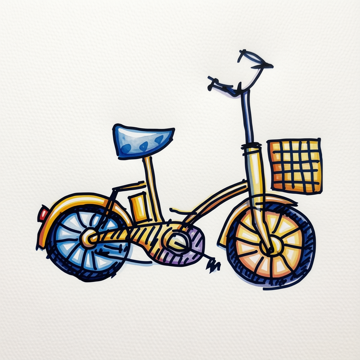
この画像の情報を取得してみる:
実行:
$ curl -s https://blog.mindboardapps.com/posts/image-to-image-qwen-image-edit-16gb-again/images/q5_bike.png | base64 | kotlin idrip.main.kts | jq .
{
  "title": "Hand-drawn Bicycle Illustration",
  "description": "A colorful, hand-drawn illustration of a vintage-style bicycle. The bike features a blue seat, a basket on the handlebars, and is rendered in a sketchy, artistic style against a light background.",
  "keywords": [
    "bicycle",
    "illustration",
    "hand-drawn",
    "vintage",
    "sketchy",
    "transportation"
  ]
}
日本語を明示的に指定して実行:
$ curl -s https://blog.mindboardapps.com/posts/image-to-image-qwen-image-edit-16gb-again/images/q5_bike.png | base64 | DRIP_LANG=Japanese kotlin idrip.main.kts | jq .
{
  "title": "自転車のイラスト",
  "description": "手描き風のイラストレーションで描かれた、レトロなスタイルの自転車です。青いサドルと、後輪に荷台のようなものが付いています。",
  "keywords": [
    "自転車",
    "イラスト",
    "レトロ",
    "手描き",
    "乗り物"
  ]
}
なんなくできた。 これで、メモを作成したときに、メモのテキストや画像に対してこれらのメタ情報を付与することができるので、 あとから検索して該当メモを見つけやすくなるであろう。
なお、テキストから要約をつくるのは Gemma 4 を使わなくても AFM で済むのだが、 AFMはイメージの入力をサポートしていない(今のところ)。 一方で Gemma 4 E4B はテキストと画像の両方入力サポートしているので、これを使っていこう考えている。 ただ、モデルを個別にダウンロードして配置、というのが地味に面倒。 特に複数マシンあったりすると。それから半年くらいたてばモデルの更新もあるかもしれない。
AFM の場合はその点OS側でモデルは用意してくれるので便利。 おそらくモデルの更新も暗黙に行われるのであろう。
さらに AFM は近い将来(macos 27)に、画像入力対応するらしい。 What’s new in the Foundation Models framework - WWDC26 - Videos - Apple Developer (Vision: Image Understanding) ただし、M1 マックなどはサポート外になるとかの話もある(推測の粋をでないので注意)。
MacBook はどれも値上がりしているし、今すぐ使えるわけじゃない。 はやくローカルLLMが普通の時代がこればいいのに。